Cute Animal with Halloween Costumes: A Designer’s Festive Toolkit
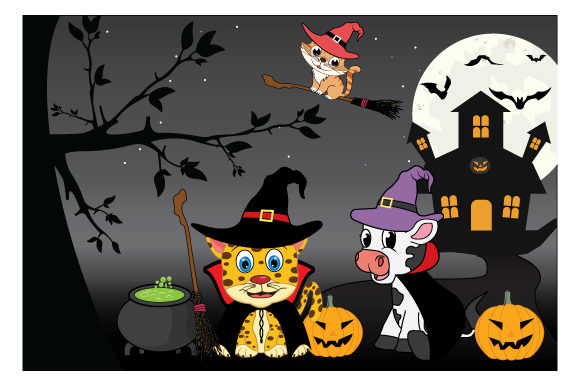
If you work in design or content creation, you know that seasonal assets are often the hardest to get right. You need something that feels fresh but also professional, playful but not childish. That is exactly the sweet spot where Cute Animal with Halloween Costumes lives. This collection isn't just a random set of spooky images; it is a curated set of high-quality vector characters that blend the adorableness of animals with the festive spirit of Halloween. We are talking about pumpkins, witch hats, vampire capes, and ghosts, all worn by charming creatures that immediately draw the eye.
The visual style here leans into a flat, modern aesthetic. You won’t find overly complex gradients or noisy textures that make editing a nightmare. Instead, the lines are clean, the color palettes are vibrant, and the shapes are distinct. This makes the assets incredibly versatile. Whether you are working on a dark, moody background or a bright, pastel autumn theme, these characters adapt well. The personality is undeniable—they strike a balance between whimsical and trendy, making them suitable for audiences ranging from toddlers to adults who love a bit of "kawaii" in their lives.
Unpacking the File Formats: Why Vector Matters
One of the most practical aspects of this package is the file delivery. The ZIP file contains SVG 1.1 format, Ai 10 format, and EPS 10 format. If you are a designer, you already know why this matters, but for the entrepreneurs and creators in the room, let’s break it down quickly.
- Ai 10 (Adobe Illustrator): This is the native format for vector editing. It preserves layers and allows you to modify every single anchor point, color, and shape with precision.
- EPS 10: This stands for Encapsulated PostScript. It is a universal vector format that almost any professional design software can open, from CorelDRAW to older versions of Illustrator. It ensures your assets are future-proof.
- SVG 1.1: Scalable Vector Graphics are the gold standard for the web. They are lightweight, load fast, and can be scaled to any screen size without pixelating. This is crucial for web design and digital marketing.
Because these are vector files, you have infinite scalability. You can put a tiny bat-cat on a business card or blow up a pumpkin-wearing panda for a trade show banner, and the quality will remain crisp. This flexibility is essential for maintaining a consistent brand identity across different mediums.
Real-World Applications for Creators and Businesses
So, how do you actually use Cute Animal with Halloween Costumes in your projects? The applications are broader than you might think. This isn't just for party invitations. It is a versatile design asset that can elevate your brand identity during the Q4 season.
Packaging and Product Design
If you sell physical goods, especially in the food, beauty, or stationery niches, Halloween is a massive sales driver. Imagine using these illustrations for limited-edition packaging. A coffee brand could feature a bear in a vampire cape on their autumn blend bag. A soap company could wrap their pumpkin spice bars in paper featuring a cat in a witch hat. It adds a layer of perceived value and fun that customers love. It turns a standard product into a collectible seasonal item.
Digital Marketing and Social Media
On platforms like Instagram and Pinterest, visual engagement is everything. These characters make for fantastic social media graphics. You can use them as stickers in your Instagram Stories, incorporate them into your email newsletter headers, or create a series of posts featuring different animals to build anticipation for a Halloween sale. Because the style is consistent, you can create a cohesive feed that looks curated and professional, rather than disjointed.
Editorial and Web Design
Bloggers and publishers can use these assets to break up text-heavy pages. If you are writing about fall recipes, DIY costumes, or spooky movie reviews, placing a cute vector animal in the sidebar or as a pull-quote graphic adds visual interest. For web design, SVGs are particularly useful here because they load instantly and look sharp on Retina displays.
Design Strategy: Using Assets Effectively
Just having a good asset isn't enough; you have to use it well. When integrating Cute Animal with Halloween Costumes into your workflow, keep a few design principles in mind.
Visual Hierarchy and Contrast
These illustrations are detailed enough to be interesting but simple enough to act as supporting elements. Don't let them overpower your message. If you are designing a poster, the text should still be king. Use the animals to frame the text or draw the eye toward a specific call-to-action, like a "Shop Now" button. The high contrast between the characters and a clean background usually works best.
Font Pairing and Typography
Since these are visual assets, they need to play nice with your typography. Because the animals are playful, you might be tempted to use a chaotic script font or a grungy display font. Be careful. The best approach is often a balance. Pair the cute illustrations with a clean sans serif font for a modern, approachable look. Alternatively, a sturdy serif font can add a touch of sophistication to the whimsy. If you are working on logo design for a seasonal campaign, ensure the typeface doesn't compete with the illustration's silhouette.
Color Theory
While the assets come with their own colors, vectors allow you to change them easily. If your brand uses specific shades of orange or purple, match the animals to your palette. This creates a seamless integration where the assets feel custom-made for your brand, rather than "off the shelf." This level of customization is what separates amateurish clip-art usage from professional graphic design.
Practical Guide for Buyers and Users
Before you download and start designing, take a moment to evaluate your project needs. This helps ensure you get the most out of your purchase.
- Audit Your Project Scope: Are you making a one-time flyer or a month-long campaign? If it's a large campaign, map out exactly where you will use these assets (email, web, print) to ensure you have enough variety in the illustration pack.
- Check Licensing: Always review the license. Since this is a premium font and asset package, it usually comes with specific terms for commercial use. Ensure your intended use—whether it's on t-shirts for sale or digital ads—falls within the allowed scope.
- Test Scalability: Open the SVG or AI file and play with the size. Zoom in. Does the line work hold up? Does it look good both large and small?
- Review Compatibility: Make sure your software can handle the files. While AI files are standard, some older software might struggle with specific vector effects. EPS 10 is usually the safest bet for maximum compatibility.
Ultimately, Cute Animal with Halloween Costumes is more than just seasonal decoration. It is a strategic tool for connection. People love animals, and people love Halloween. Combining them creates an immediate emotional response. Whether you are a small business owner trying to boost holiday sales, a blogger wanting to delight readers, or a designer